Showing posts with label Netbackup. Show all posts

Netbackup: oprd returned abnormal status (96)

It started when i got this message on of the the media server:


Mar 11, 2012 2:55:55 PM - awaiting resource mediaserver013_tld2. Waiting for resources.           Reason: Tape media server is not active, Media server:  mediaserver013 ,           Robot Type(Number): TLD(2), Media ID: N/A, Drive Name: N/A,           Volume Pool: LTO2, Storage Unit:  mediaserver013 _tld2, Drive Scan Host: N/A,           Disk Pool: N/A, Disk Volume: N/A 


Further check on media server it self, reveal this error:


root@ mediaserver013 /usr/openv/volmgr/bin/vmoprcmd -doprd returned abnormal status (96)IPC Error: Daemon may not be running
What i did to resolve this:

One media server, stop NBU services
root@ mediaserver013  # /usr/openv/netbackup/bin/goodies/netbackup stop


Stop PBX Exchange on media server
root@ mediaserver013 # /opt/VRTSpbx/bin/vxpbx_exchanged stop


Run nbrbutil command on Master server to reset any allocation on that media server
root@ masterserver#/usr/openv/netbackup/bin/admincmd/nbrbutil -resetMediaServer mediaserver013 


Start PBX Exchange on media server
root@ mediaserver013 # /opt/VRTSpbx/bin/vxpbx_exchanged start


Start NBU services on media server
root@ mediaserver013  # /usr/openv/netbackup/bin/goodies/netbackup start


Types of Backup

This explanations from Acronis is easy to understand for beginners:


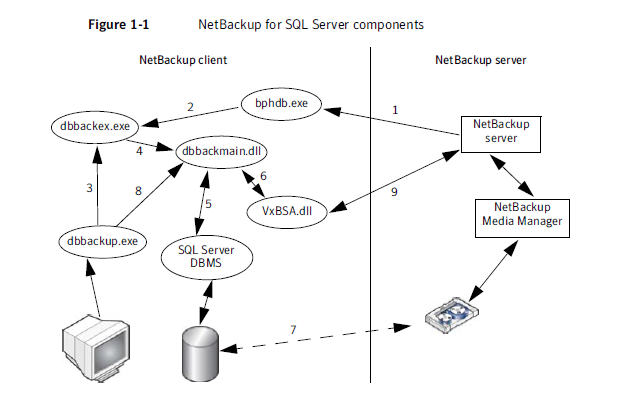
Netbackup MS-SQL Backup Processes

If you tried to cancelled backup jobs from NBU GUI but the next stream still keep spawned a new job (in a case where many Database in one server).  This process call dbbackex.exe on the MS SQL Client will still be listed as running in Task Manager. If several MS SQL backups have failed, an identical number of dbbackex.exe instances will be listed in Task Manager. These can safely be killed.  The reason for the hang is that the error message returned by the SQL Server is not being handled by dbbackex.exe and this process dbbackex.exe  can be killed if the MS-SQL backup job wont killed.


The correct behavior in such a situation is that dbbackex.exe should skip the database and continue to back up the remaining databases


More details on DBBACKEX.exe Taken from NBU for MS-SQL Server admin Guide.


■ The NetBackup for SQL Server GUI (dbbackup.exe) allows you to browse for
SQL Server objects, normally, databases, filegroups, and database files.
dbbackup.exe invokes dbbackmain.dll (8) for accessing the SQL Server
master database. NetBackup for SQL Server accesses information about SQL
Server using ODBC.
■ The NetBackup for SQL Server GUI (dbbackup.exe) also allows you to browse
for SQL backup images. The NetBackup catalog contains the images you can
browse. To access the contents of the catalog the GUI invokes
dbbackmain.dll, which uses VxBSA function calls to access the NetBackup
Server database manager.

Symantec NetBackup Ends the Backup Window with 100 Times Faster Backups

Symantec is delivering a new approach to data protection and introducing NetBackup 7.5 with new options, including NetBackup Accelerator to speed backups by up to 100 times while delivering “Instant Full Recovery” capability, NetBackup Replication Director to integrate NetApp® Snapshots™ with backup, and NetBackup Search to allow simple search and recovery of backup data and selective legal hold. Unlike other backup technology that relies on the IT team to integrate multiple disparate backup solutions, NetBackup is available as a single integrated appliance for the data center, remote office and virtual environments, providing customers with simplified deployment and operations.


Read more on Symantec Press Release HERE

Netbackup Media in use

ERROR: When attempting a restore, the required media will not mount, stating "Media is in use", when it is known that the media is not physically in use. The restore appears to hang.


We can release the media by the allocationKey :

backupserver-root /usr/openv/netbackup/bin/admincmd: ./nbrbutil -dump > /var/tmp/nbrb.out

 Media ID in this case is SL2531


backupserver-root /usr/openv/netbackup/bin/admincmd: cat /var/tmp/nbrb.out |grep SL2531
         index=0 (Request provider=TapeSpanProvider resourcename=NEXT MEDIA RESOURCE  userSequence=0 (mediatapespanrequest: request=(MediaRequest: mediaId=SL2531 mediaServer=mediaserver1.int.com mediaKey=0 userReservationId= assignedTime=1324299337 client=uk1us00001.corpnet2.com usageType=2 mustBeNdmp=no driveName=STVDSADI001_P1_20 drivePath= mediaPool= robotNumber=-1 slotNumber=-1 density=-1 ndmpControlHost= failIfNoMedia=yes externalFile= mediaType=2 mediaSubType=0 isNdmp=false isTirRestore=false isFlashbackupRestore=false isBlockMapRead=false isCatalogBackup=false isGcsCatalogBackup=false isVMWare=false isLifeCycle=false preferVtlToDirectAttachedTape=true) previousid={E371B58A-1DD1-11B2-913D-0003BA36C061} previousFailed=no)))
        MdsAllocation: allocationKey=455557 jobType=2 mediaKey=4005380 mediaId=SL2531 driveKey=0 driveName= drivePath= stuName= masterServerName=stvsxbak03.ggr.co.uk mediaServerName=mediaserver1.int.com ndmpTapeServerName= diskVolumeKey=0 mountKey=0 linkKey=0 fatPipeKey=0 scsiResType=0 serverStateFlags=0

Now release the media by referring its allocation ID which is 455557:

backupserver-root /usr/openv/netbackup/bin/admincmd: ./nbrbutil -releaseMDS 455557
Refer here for more information.

How to initiate image clean up manually

How to initiate image clean up manually against all media server.

#/usr/openv/netbackup/bin/admincmd/bpimage -cleanup -allclients

NBU 7.X: All UNIX 32-bit system support has been discontinued

 From the NetBackup 7.0 Release Notes: "...
All UNIX 32-bit system support has been discontinued. To upgrade these systems to NetBackup 7.0, you must first migrate your current NetBackup 6.x catalogs and databases to a system with a supported platform. However, 32-bit media servers and clients that use NetBackup 6.x are compatible with 64-bit master servers that use NetBackup 7.0.


FT pipes are in use

In a SAN Client environment, sometime we will see this errors while the jobs seems running but actually its queuing waiting for the FT Pipes to be opened.  But, often the FT pipes are available but some of them has been orphaned due to CORBA exception during cleanup. And if its reached time out you will get error code 83 on netbackup job.

In the Job Details, this will indicates and show you the FT Pipes are in use:
Sep 23, 2011 7:02:09 AM - awaiting resource stug-dpad_nbx_01. Waiting for resources.
          Reason: FT pipes are in use, Media server: nbu004.net2.com,
          Robot Type(Number): NONE(N/A), Media ID: N/A, Drive Name: N/A,
          Volume Pool: NetBackup, Storage Unit: stu-dpad_nbu004_01, Drive Scan Host: N/A,
          Disk Pool: dpad_nbu004_01, Disk Volume: /opt/openv/dpad_nbu004_01_06
Now, we list the orphaned pipes:
# /usr/openv/netbackup/bin/admincmd/nbrbutil -listOrphanedPipes

Pipe ID         Pipe State              Media Server
==============================================================================
3               PIPE_ORPHANED           nbu002.net2.com
10              PIPE_ORPHANED           nbu005.net2.com
12              PIPE_ORPHANED           nbu005.net2.com
13              PIPE_ORPHANED           nbu005.net2.com
14              PIPE_ORPHANED           nbu005.net2.com
15              PIPE_ORPHANED           nbu005.net2.com
16              PIPE_ORPHANED           nbu005.net2.com
4               PIPE_ORPHANED           nbu006.net2.com
5               PIPE_ORPHANED           nbu006.net2.com
6               PIPE_ORPHANED           nbu006.net2.com
7               PIPE_ORPHANED           nbu006.net2.com
8               PIPE_ORPHANED           nbu006.net2.com
9               PIPE_ORPHANED           nbu006.net2.com
10              PIPE_ORPHANED           nbu006.net2.com
11              PIPE_ORPHANED           nbu006.net2.com
12              PIPE_ORPHANED           nbu006.net2.com
13              PIPE_ORPHANED           nbu006.net2.com
15              PIPE_ORPHANED           nbu006.net2.com
16              PIPE_ORPHANED           nbu006.net2.com
16              PIPE_ORPHANED           nbu008.net2.com
1               PIPE_ORPHANED           nbu009.net2.com
3               PIPE_ORPHANED           nbu009.net2.com
4               PIPE_ORPHANED           nbu009.net2.com
5               PIPE_ORPHANED           nbu009.net2.com
6               PIPE_ORPHANED           nbu009.net2.com
7               PIPE_ORPHANED           nbu009.net2.com
8               PIPE_ORPHANED           nbu009.net2.com
9               PIPE_ORPHANED           nbu009.net2.com
14              PIPE_ORPHANED           nbu009.net2.com
15              PIPE_ORPHANED           nbu009.net2.com
16              PIPE_ORPHANED           nbu009.net2.com
8               PIPE_ORPHANED           nbu002.net2.com
12              PIPE_ORPHANED           nbu002.net2.com
1               PIPE_CLIENT_ORPHANED    nbu003.net2.com
2               PIPE_CLIENT_ORPHANED    nbu003.net2.com
3               PIPE_CLIENT_ORPHANED    nbu003.net2.com
4               PIPE_CLIENT_ORPHANED    nbu003.net2.com
5               PIPE_CLIENT_ORPHANED    nbu003.net2.com
6               PIPE_CLIENT_ORPHANED    nbu003.net2.com
7               PIPE_CLIENT_ORPHANED    nbu003.net2.com
8               PIPE_CLIENT_ORPHANED    nbu003.net2.com
9               PIPE_CLIENT_ORPHANED    nbu003.net2.com
10              PIPE_CLIENT_ORPHANED    nbu003.net2.com
11              PIPE_CLIENT_ORPHANED    nbu003.net2.com
12              PIPE_CLIENT_ORPHANED    nbu003.net2.com
13              PIPE_CLIENT_ORPHANED    nbu003.net2.com
14              PIPE_CLIENT_ORPHANED    nbu003.net2.com
15              PIPE_CLIENT_ORPHANED    nbu003.net2.com
16              PIPE_CLIENT_ORPHANED    nbu003.net2.com
1               PIPE_CLIENT_ORPHANED    nbu004.net2.com
2               PIPE_CLIENT_ORPHANED    nbu004.net2.com
3               PIPE_CLIENT_ORPHANED    nbu004.net2.com
4               PIPE_CLIENT_ORPHANED    nbu004.net2.com
6               PIPE_CLIENT_ORPHANED    nbu004.net2.com
7               PIPE_CLIENT_ORPHANED    nbu004.net2.com
8               PIPE_CLIENT_ORPHANED    nbu004.net2.com
9               PIPE_CLIENT_ORPHANED    nbu004.net2.com
10              PIPE_CLIENT_ORPHANED    nbu004.net2.com
11              PIPE_CLIENT_ORPHANED    nbu004.net2.com
12              PIPE_CLIENT_ORPHANED    nbu004.net2.com
13              PIPE_CLIENT_ORPHANED    nbu004.net2.com
14              PIPE_CLIENT_ORPHANED    nbu004.net2.com
15              PIPE_CLIENT_ORPHANED    nbu004.net2.com
16              PIPE_CLIENT_ORPHANED    nbu004.net2.com
1               PIPE_CLIENT_ORPHANED    nbu005.net2.com
2               PIPE_CLIENT_ORPHANED    nbu005.net2.com
3               PIPE_CLIENT_ORPHANED    nbu005.net2.com
4               PIPE_CLIENT_ORPHANED    nbu005.net2.com
5               PIPE_CLIENT_ORPHANED    nbu005.net2.com
6               PIPE_CLIENT_ORPHANED    nbu005.net2.com
7               PIPE_CLIENT_ORPHANED    nbu005.net2.com
8               PIPE_CLIENT_ORPHANED    nbu005.net2.com
9               PIPE_CLIENT_ORPHANED    nbu005.net2.com
11              PIPE_CLIENT_ORPHANED    nbu005.net2.com
2               PIPE_CLIENT_ORPHANED    nbu006.net2.com
1               PIPE_CLIENT_ORPHANED    nbu006.net2.com
14              PIPE_CLIENT_ORPHANED    nbu006.net2.com
1               PIPE_CLIENT_ORPHANED    nbu007.net2.com
2               PIPE_CLIENT_ORPHANED    nbu007.net2.com
3               PIPE_CLIENT_ORPHANED    nbu007.net2.com
4               PIPE_CLIENT_ORPHANED    nbu007.net2.com
5               PIPE_CLIENT_ORPHANED    nbu007.net2.com
6               PIPE_CLIENT_ORPHANED    nbu007.net2.com
7               PIPE_CLIENT_ORPHANED    nbu007.net2.com
8               PIPE_CLIENT_ORPHANED    nbu007.net2.com
9               PIPE_CLIENT_ORPHANED    nbu007.net2.com
10              PIPE_CLIENT_ORPHANED    nbu007.net2.com
11              PIPE_CLIENT_ORPHANED    nbu007.net2.com
12              PIPE_CLIENT_ORPHANED    nbu007.net2.com
13              PIPE_CLIENT_ORPHANED    nbu007.net2.com
14              PIPE_CLIENT_ORPHANED    nbu007.net2.com
15              PIPE_CLIENT_ORPHANED    nbu007.net2.com
16              PIPE_CLIENT_ORPHANED    nbu007.net2.com
1               PIPE_CLIENT_ORPHANED    nbu008.net2.com
2               PIPE_CLIENT_ORPHANED    nbu008.net2.com
3               PIPE_CLIENT_ORPHANED    nbu008.net2.com
4               PIPE_CLIENT_ORPHANED    nbu008.net2.com
5               PIPE_CLIENT_ORPHANED    nbu008.net2.com
6               PIPE_CLIENT_ORPHANED    nbu008.net2.com
7               PIPE_CLIENT_ORPHANED    nbu008.net2.com
8               PIPE_CLIENT_ORPHANED    nbu008.net2.com
9               PIPE_CLIENT_ORPHANED    nbu008.net2.com
10              PIPE_CLIENT_ORPHANED    nbu008.net2.com
11              PIPE_CLIENT_ORPHANED    nbu008.net2.com
12              PIPE_CLIENT_ORPHANED    nbu008.net2.com
13              PIPE_CLIENT_ORPHANED    nbu008.net2.com
14              PIPE_CLIENT_ORPHANED    nbu008.net2.com
15              PIPE_CLIENT_ORPHANED    nbu008.net2.com
6               PIPE_CLIENT_ORPHANED    nbu002.net2.com
10              PIPE_CLIENT_ORPHANED    nbu002.net2.com
14              PIPE_CLIENT_ORPHANED    nbu002.net2.com
16              PIPE_CLIENT_ORPHANED    nbu002.net2.com


As you can see, i have a lot of orphaned PIPES to be cleared.  Run below command to release the orphaned pipes:
# /usr/openv/netbackup/bin/admincmd/nbrbutil  -releaseOrphanedPipes
 List back if there's anymore orphaned pipes , it should be gone by now:
# /usr/openv/netbackup/bin/admincmd/nbrbutil -listOrphanedPipes

SORT tools for NetBackup users

SORT provides information on whether your environment is compatible with a NetBackup installation or upgrade, and gives you links to the latest documentation and software.

This portals provide Installation and Upgrade Checklist and Custom Reports for your environment for NBU & Storage Foundation.

Installation and Upgrade Checklist NBU Sample:
https://sort.symantec.com/checklist/install/nbu_sample_unix

Custom reports give you server-specific recommendations for installing and upgrading Symantec enterprise products, managing risks, and tracking product licenses.
Installation and Upgrade Report Sample:
https://sort.symantec.com/sample/install_and_upgrade_nbu

SORT LINK:https://sort.symantec.com/netbackup

NETBACKUP BPRDREQ COMMAND

After making any changes to the bp.conf file on a VERITAS NetBackup (tm) server, this command can be used to reread the configuration without having to stop and restart the NetBackup daemons. This command located in:

/usr/openv/netbackup/bin/admincmd/bprdreq --
bprdreq: unrecognized option --
bprdreq: [-alive] [-logstatus] [-terminate] [-setverbose]
     [-M ]
     [-rereadconfig] [-master] [-startsched]
     [-recyclelogs ] [-wakeup ]
     [-recyclejobs] [-verbose] [-suspend_cancel_all]
         [-suspend_cancel_selective]
How to use it to reload the bp.conf configurations file:


/usr/openv/netbackup/bin/admincmd/bprdreq -rereadconfig

 
Note: This command will only detect and incorporate some bp.conf configuration changes. Many NetBackup configuration changes, such as adding or changing a SERVER entries, MEDIA SERVER entries, require a complete stop and start of the NetBackup daemons. If the bp.conf configuration change does not take effect, then the NetBackup daemons must be restarted. But usually this command works if you change the VERBOSE setting in bp.conf in troubleshooting process.


Netbackup VxLog Configurations

Verify current configurations of the Veritas Unified Logs (VxLog)
bash-3.00# /usr/openv/netbackup/bin/vxlogcfg -p 51216 -o Default -l
Configuration settings for originator 112, of product 51216...
LogDirectory = /usr/openv/logs/
DebugLevel = 1
DiagnosticLevel = 1
DynaReloadInSec = 0
LogToStdout = False
LogToStderr = False
LogToOslog = False
RolloverMode = LocalTime
LogRecycle = True
MaxLogFileSizeKB = 51200
RolloverPeriodInSeconds = 43200
RolloverAtLocalTime = 0:01
NumberOfLogFiles = 14
OIDNames =
L10nLib = /usr/openv/lib/libvxexticu.so.1
L10nResourceDir = /usr/openv/resources
SyslogIdent = VRTS-NB
SyslogOpt = 0
SyslogFacility = LOG_LOCAL5
LogFilePermissions = 664
Set the maximum logging level for all daemons run:

/usr/openv/netbackup/bin/vxlogcfg -a -p 51216 -o Default -s DebugLevel=5 -s DiagnosticLevel=5

Return to the default level of logging for all daemons run:
/usr/openv/netbackup/bin/vxlogcfg -a -p 51216 -o Default -s DebugLevel=1 -s DiagnosticLevel=1

Disable logging for all daemons run:
/usr/openv/netbackup/bin/vxlogcfg -a -p 51216 -o Default -s DebugLevel=1 -s DiagnosticLevel=0

Verify it again:
/usr/openv/netbackup/bin/vxlogcfg -p 51216 -o Default -l


Recycling unified log files
/usr/openv/netbackup/bin/vxlogcfg -a -p 51216 -o Default -s LogRecycle=true

Configure the NumberOfLogFiles setting.  The following example will keep 14 days worth of logs when using vxlogmgr to delete log files
/usr/openv/netbackup/bin/vxlogcfg -a -p 51216 -o Default -s NumberOfLogFiles=14

Manually delete unified log files (this will delete vxlog based on NumberofLogFiles setting) if older than that:
/usr/openv/netbackup/bin/vxlogcfg vxlogmgr -a –d
Manually delete unified log files based on criteria , date or originator ID:
Delete all Unified log files created before midnight on 10/20/2010:
# vxlogmgr --del -e '10/20/2010 00:00:00 AM'
The following command will delete all Unified log files for the NetBackup product created on and before 10/20/2010.
# vxlogmgr --del -p 51216 -e '10/20/2005 23:59:59 PM'
The following command will delete all Unified log files for the NetBackup nbpem daemon created before 1PM on 10/20/2010.
# vxlogmgr --del -p 51216 -o 116 -e '10/20/2010 01:00:00 PM'

Directories used with Unified Logging
The /usr/openv/logs directory on the Master/EMM server stores log files.  Unlike Legacy logging, no directories need to be created for Unified logging to take effect.  By default logging is enabled at the lowest level and can be adjusted as needed using the vxlogcfg command.  

The format for the file names stores in the /usr/openv/logs directory is as follows:
----.log

The for NetBackup is 51216.  A list of Product Id's can be found in the /etc/vx/vrtslog.conf file.
The will indicate what process the log is for.  A list of Originator Id's can be found in the /usr/openv/netbackup/nblog.conf file.
The indicates the host ID of the machine.
The indicates the date of the log and is in YYMMDD format.
The is used to rotate the logs to control log size and disk space usage.
Example:
bash-3.00# ls -lrth
total 80924220
drwxr-xr-x   2 root     root          96 Aug 20  2010 lost+found
-rw-rw-r--   1 root     root        5.2K Apr  2 22:44 51216-166-2234025388-110402-0000000000.log
-rw-rw-r--   1 root     root        153M Apr  3 23:46 51216-226-2234025388-110403-0000000000.log
-rw-rw-r--   1 root     root         12M Apr  4 00:00 51216-116-2234025388-110403-0000000000.log
-rw-rw-r--   1 root     root        1.6M Apr  4 00:00 51216-222-2234025388-110403-0000000000.log
-rw-rw-r--   1 root     root         48M Apr  4 00:00 51216-272-2234025388-110403-0000000000.log
-rw-rw-r--   1 root     root        332M Apr  4 00:00 51216-132-2234025388-110403-0000000000.log
-rw-rw-r--   1 root     root        387M Apr  4 00:00 51216-117-2234025388-110403-0000000000.log
-rw-rw-r--   1 root     root        340M Apr  4 00:00 51216-118-2234025388-110403-0000000000.log
-rw-rw-r--   1 root     root        2.1G Apr  4 00:00 51216-111-2234025388-110403-0000000000.log
-rw-rw-r--   1 root     root        235M Apr  4 23:55 51216-226-2234025388-110404-0000000000.log
-rw-rw-r--   1 root     root         13M Apr  4 23:59 51216-116-2234025388-110404-0000000000.log

Commands used with Unified Logging
There are three primary commands used with Unified logging.  These are:
vxlogview - This command is used to view the Unified log files.  The vxlogview command allows the administrator to search by process (also known as an originator), Job ID, timeframe, etc. to display only the log entries needed to help isolate a problem.
·     vxlogcfg - This command is used to configure Unified logging settings such as how many days to keep logs, when to rotate log files as well as other settings.
·     vxlogmgr - This command is used to manage Unified log files and can be used to move or delete logs.  This can also be used to upload logs to a directory which can then be sent to Symantec Enterprise Technical Support for analysis.

Netbackup: getsockopt SO_ERROR returned: 146 on RHEL (status code 57)

This is typical error on RHEL, the symptom is you'll getting status code 57 (client connection refused) from the activity monitor.
bash-2.03# /usr/openv/netbackup/bin/admincmd/bptestbpcd -debug -verbose -client linuxclient2.com
21:46:49.201 [14785] <2> bptestbpcd: VERBOSE = 0
21:46:49.233 [14785] <2> vnet_async_connect: vnet_vnetd.c.4237: getsockopt SO_ERROR returned: 146 0x00000092
21:46:49.235 [14785] <2> vnet_async_connect: vnet_vnetd.c.4237: getsockopt SO_ERROR returned: 146 0x00000092
21:46:50.235 [14785] <2> vnet_async_connect: vnet_vnetd.c.4237: getsockopt SO_ERROR returned: 146 0x00000092
21:46:50.236 [14785] <2> vnet_async_connect: vnet_vnetd.c.4237: getsockopt SO_ERROR returned: 146 0x00000092
21:46:52.236 [14785] <2> vnet_async_connect: vnet_vnetd.c.4237: getsockopt SO_ERROR returned: 146 0x00000092
21:46:52.239 [14785] <2> vnet_async_connect: vnet_vnetd.c.4237: getsockopt SO_ERROR returned: 146 0x00000092

Now access client linuxclient2.com and verify the xinetd process, usually when you getting socket error on new built server is because of this:

[root@linuxclient2 ~]# ps -ef|grep inetd
root     15700 15669  0 21:46 pts/0    00:00:00 grep inetd
[root@linuxclient2 ~]#  /etc/init.d/xinetd status
xinetd is stopped
[root@linuxclient2 ~]#  /etc/init.d/xinetd start
Starting xinetd:                                           [  OK  ]
[root@linuxclient2 ~]# ps -ef|grep inetd
root     15918     1  0 21:48 ?        00:00:00 xinetd -stayalive -pidfile /var/run/xinetd.pid
root     15921 15669  0 21:48 pts/0    00:00:00 grep inetd
[root@linuxclient2 tmp]# /etc/init.d/xinetd status
xinetd (pid  2965) is running...
Now go back to Master Server and run bptestbpcd again:
bash-2.03# /usr/openv/netbackup/bin/admincmd/bptestbpcd -debug -verbose -client linuxclient2.com

21:49:08.513 [15768] <2> bptestbpcd: VERBOSE = 0
21:49:08.557 [15768] <2> vnet_vnetd_service_socket: vnet_vnetd.c.2048: VN_REQUEST_SERVICE_SOCKET: 6 0x00000006
21:49:08.557 [15768] <2> vnet_vnetd_service_socket: vnet_vnetd.c.2062: service: bpcd
21:49:08.600 [15768] <2> logconnections: BPCD CONNECT FROM 143.193.71.13.63012 TO 10.239.104.19.13724
21:49:08.603 [15768] <2> vnet_connect_to_vnetd_extra: vnet_vnetd.c.182: msg: VNETD CONNECT FROM 143.193.71.13.63013 TO 10.239.104.19.13724 fd = 6
21:49:08.622 [15768] <2> vnet_vnetd_connect_forward_socket_begin: vnet_vnetd.c.535: VN_REQUEST_CONNECT_FORWARD_SOCKET: 10 0x0000000a
21:49:08.666 [15768] <2> vnet_vnetd_connect_forward_socket_begin: vnet_vnetd.c.552: ipc_string: /tmp/vnet-18988301536148664037000000000-RzfjSb
1 1 1
143.193.71.13:63012 -> 10.239.104.19:13724
143.193.71.13:63013 -> 10.239.104.19:13724
21:49:08.866 [15768] <2> bpcr_get_peername_rqst: Server peername length = 17
21:49:08.966 [15768] <2> bpcr_get_hostname_rqst: Server hostname length = 25
21:49:09.066 [15768] <2> bpcr_get_clientname_rqst: Server client name length = 25
21:49:09.166 [15768] <2> bpcr_get_version_rqst: bpcd version: 06540000
21:49:09.266 [15768] <2> bpcr_get_platform_rqst: Server client platform length = 14
21:49:09.366 [15768] <2> bpcr_get_version_rqst: bpcd version: 06540000
21:49:09.467 [15768] <2> bpcr_patch_version_rqst: theRest == > <
21:49:09.468 [15768] <2> bpcr_get_version_rqst: bpcd version: 06540000
21:49:09.566 [15768] <2> bpcr_patch_version_rqst: theRest == > <
21:49:09.567 [15768] <2> bpcr_get_version_rqst: bpcd version: 06540000
PEER_NAME = masterserver.com
HOST_NAME = linuxclient2.com
CLIENT_NAME = linuxclient2.com
VERSION = 0x06540000
PLATFORM = linuxR_x86_2.6
PATCH_VERSION = 6.5.6.0
SERVER_PATCH_VERSION = -1.-1.-1.-1
MASTER_SERVER = masterserver.com
EMM_SERVER = masterserver.com
21:49:09.673 [15768] <2> vnet_connect_to_vnetd_extra: vnet_vnetd.c.182: msg: VNETD CONNECT FROM 143.193.71.13.63028 TO 10.239.104.19.13724 fd = 8
21:49:09.695 [15768] <2> vnet_vnetd_connect_forward_socket_begin: vnet_vnetd.c.535: VN_REQUEST_CONNECT_FORWARD_SOCKET: 10 0x0000000a
21:49:09.739 [15768] <2> vnet_vnetd_connect_forward_socket_begin: vnet_vnetd.c.552: ipc_string: /tmp/vnet-18989301536149737033000000000-VQwExj
143.193.71.13:63028 -> 10.239.104.19:13724
<2>bptestbpcd: EXIT status = 0
21:49:09.745 [15768] <2> bptestbpcd: EXIT status = 0

Backup should now completed, from the NBU activity monitor the jobid is 6770640:
bash-2.03# /usr/openv/netbackup/bin/admincmd/bperror -U -jobid 6770640       3/30/2011 22:00:32 mediaserver linuxclient2.com  CLIENT       linuxclient2.com  POLICY Unix_Mon  SCHED       Weekly_full  EXIT STATUS 0 (the requested operation was       successfully completed)

Netbackup nbrbutil command

The nbrbutil command is useful when working with Resource Broker related issues.  The command can be found in the following locations:

Windows:  \NetBackup\bin\admincmdUNIX:  /usr/openv/netbackup/bin/admincmd
Switches are as follows:
SwitchFunction
-dumpDump all nbrb allocation and request list
-dumptables [-f filename]Have nbrb log its internal state
-release [GUID]Release the allocation with the given identifier
-cancel [GUID]Cancel the allocation request with the given identifier
-resetAllReset all nbrb allocations, requests, and persisted state
-resetMediaServer [mediaserver]Reset all nbrb EMM/MDS allocations related to LTID on the mediaserver
-listOrphanedMediaList media reserved in EMM but with no corresponding allocation in RB
-listOrphanedDrivesList drives reserved in EMM but with no corresponding allocation in RB
-listOrphanedStusList storage units reserved in EMM but with no corresponding allocation in RB
-releaseOrphanedMedia [name]Release media reserved in EMM but with no corresponding allocation in RB
-releaseOrphanedDrive [name]Release drives reserved in EMM but with no corresponding allocation in RB
-releaseOrphanedStu [name]Release storage units reserved in EMM but with no corresponding allocation in RB
-releaseMDS [ID]Release EMM/MDS allocations by MDS allocation ID
-releaseAllocHoldsRelease allocation holds due to alloction errors for drives/media
-suspendSuspend nbrb processing
-resumeResume nbrb processing
-releaseDrive Release all allocations for the named drive.
-releaseMedia Release all allocations for the named media ID.
-listOrphanedPipes List orphaned Fibre transport pipes.
-releaseOrphanedPipes Release orphaned fibre transport pipes.
/apps/media/inquira/resources /resources


How to analyze Netbackup Unified Logs

For legacy Netbackup logs which is located under /usr/openv/netbackup/logs , below numbers can indicate to you the severity when troubleshooting. Usually look at number 16 for error or 32 for fatal error which means you need to focus and google that error to look for answer:

Severity:
1 = Unknown
2 = Debug
4 = Info
8 = Warning
16 = Error
32 = Critical

Example:
bash-3.00# pwd
/usr/openv/netbackup/logs/dbclient
bash-3.00# grep -i "<16>" log.032211
01:01:47.985 [19945] <16> readCommFile: ERR - timed out after 900 seconds while reading from /usr/openv/netbackup/logs/user_ops/dbext/logs/19945.0.1300767393
01:01:47.985 [19945] <16> VxBSAEndTxn: ERR - bsa_close() failed.
01:01:47.986 [19945] <16> xbsa_EndTransaction: ERR - VxBSAEndTxn: Failed with error:
02:27:59.607 [944] <16> readCommFile: ERR - timed out after 900 seconds while reading from /usr/openv/netbackup/logs/user_ops/dbext/logs/944.0.1300772039

The following directories can be created for administrative command logging.
/usr/openv/netbackup/logs/admin - Log used as a central logging repository for all the commands located in the /usr/openv/netbackup/bin/admincmd directory.
• /usr/openv/netbackup/logs/bp - Log for the curses-based bp interface program (client-side).
• /usr/openv/netbackup/logs/bpadm - Log for the curses-based bpadm interface program (server-side).
• /usr/openv/netbackup/logs/bparchive - High-level logging of the bparchive command.
• /usr/openv/netbackup/logs/bpbackup - High-level logging of the bpbackup command.
• /usr/openv/netbackup/logs/bpdbjobs - High-level logging of the backup and restore job reporter command.
• /usr/openv/netbackup/logs/bplist - High-level logging of the detailed image list reporting command.
• /usr/openv/netbackup/logs/bpmount - High-level logging for the drive-listing command, used for ALL_LOCAL_DRIVES on the client.
• /usr/openv/netbackup/logs/bprestore - High-level logging of the restore command.

Logs for NetBackup daemons and other automatically-run commands:
• /usr/openv/netbackup/logs/bpbkar - Logs for the backup and archive daemon on the client (backup and archive operations).
• /usr/openv/netbackup/logs/bpbrm - Logs for the backup and restore manager on the media server.
• /usr/openv/netbackup/logs/bpbrmds - Logs for the backup and restore manager on the media server (for disk staging operations).
• /usr/openv/netbackup/logs/bpcd - Logs for the communications daemon on media servers and clients.
• /usr/openv/netbackup/logs/bpcoord - (For NetBackup 5.x) Logs for the bpcoord daemon started by bpsynth on the master server.
• /usr/openv/netbackup/logs/bpdbm - Logs for the database manager daemon on the master server.
• /usr/openv/netbackup/logs/bpdm - Logs for the disk manager daemon on the media server (disk storage units only).
• /usr/openv/netbackup/logs/bpjava-msvc - Java GUI authentication service on the master server.
• /usr/openv/netbackup/logs/bpjava-susvc - (For NetBackup 4.5 and 5.x) Java GUI login service on the master server.
• /usr/openv/netbackup/logs/bpjava-usvc - Java GUI "user" service on the master server.
• /usr/openv/netbackup/logs/bprd - Logs for the request daemon on the master server.
• /usr/openv/netbackup/logs/bpsched - Logs for the scheduler daemon on the master server.
• /usr/openv/netbackup/logs/bpsynth - (For NetBackup 5.x) Logs for the bpsynth process for synthetic backups on the master server.
• /usr/openv/netbackup/logs/bptm - Logs for the tape manager daemon on the media server (media manager storage units only).
• /usr/openv/netbackup/logs/mtfrd - (For NetBackup 5.x) Logs for phase 2 import of Backup Exec media on the master server.
• /usr/openv/netbackup/logs/tar - Logs for the restore daemon on the client (restore operations).
• /usr/openv/netbackup/logs/user_ops - Contains directories and files used by Java and database agents on servers and clients.
• /usr/openv/netbackup/logs/bphdb - Logs for the program that starts scripts to backup the database on servers and clients.
• /usr/openv/netbackup/logs/dbclient - log for the DB Extension clients

Daemons that use Unified Logging
A listing of processes and originators that use Unified logging include, but are not limited to:
  • NetBackup Policy Execution Manager (nbpem)
  • NetBackup Job Manager (nbjm)
  • NetBackup Resource Broker (nbrb)
  • NetBackup Enterprise Media Manager (nbemm)
  • NetBackup Service Layer (nbsl)
  • NetBackup Generic Job (nbgenjob)
  • NetBackup Notification Service (nbnos)
  • NetBackup for NDMP and ndmpagent
  • NetBackup avrd and robotic processes
  • NetBackup Operations Monitor (NOMTRS, NOMClient and NOMServer)
  • Bare Metal Restore daemons (bmrd, bmbbd, bmrc, bmrs, bmrconfig, bmrsavecfg, bmrsrtadm, bmrprep, bmrsetupmaster, bmrsetupboot, bmrpkg, bmrcreatepkg, bmrcreatefloppy.exe, bmrrst.exe and bmrmap.exe)
  • VERITAS Private Branch Exchange (VxPBX)

Daemons that continue to use Legacy logging
A listing of daemons that use Legacy logging include, but are not limited to:
  • NetBackup Master Server daemons (bprd, bpdbm, bpjobd, bpdbjobs, admin)
  • NetBackup Media Server daemons (bpbrm, bptm, bpdm)
  • NetBackup Robotic daemons (vmd, avrd, ltid and robotic daemons)
  • NetBackup Client daemons (bpcd, bpbkar, tar)


NetBackup Domain Network Analyzer (NBDNA)

Interesting topic Highlight from the Symantec NetBackup Customer Forum in September 2010.

Topic: NetBackup Domain Network Analyzer (NBDNA)

This is a utility that analyzes the NetBackup domain and its configuration for network issues, performance, and behavior in regards to hostname lookup and connectivity between NetBackup hosts and their role within the NetBackup domain.


NetBackup Domain Network Analyzer (NBDNA) from Peter Elliman on Vimeo.

Netbackup SAN Client Overview

Starting NBU 6.5 & above, Netbackup introduce SAN Client to provide fibre transport backup.  This will reduce cost to the customer as before this server with huge data will only have Media server and its license more costly than SAN Client.