Verify Bios Mode/Boot Environment Mode in Windows 2008

Typical way is to run msinfo32 and from the start menu but most of the time the information was not there.

Here is the other way round.

1. Check this file : C:\Windows\Panther\setupact.log


2.Launch Control panel - Administrative tools - Computer management
Check Disk management tab. You should have EFI Encrypted partition (around 100mb). Also, when you right-click your HDD, on the Volumes tab you should see GPT partitioning, (not legacy MBR).

The GPT is part of UEFI package

Redirect Avamar System State Backup to another Drives


On Windows 2003 AVAMAR client uses the NTBackup Utility to create a backup of the system state, it stores this backup in var in the avamar client install directory (C:\Program Files\avs\var\).  If the space on that drive is limited you can set an attribute systemstatefile with a value of the full path to store the back up –


To modify the location for just one client individually:

1. Log on the Windows client 
2. Go to the AVAMAR_INSTALL_PATH\avs\var directory 
3. Create a file named avtar.cmd 
4. Edit this avtar.cmd file with notepad and add the parameter as given below: 

--systemstatefile=NEW_LOCATION 


For example, 
-- systemstatefile="D:\Avamar_BKF\systemstate.bkf"
Notes: You must now include this location as part of the dataset of the File System backup

Calculate the size of f_cache and p_cache for AVAMAR

Formulas to help determine the correct size of your f_cache and p_cache for AVAMAR backups

AVAMAR F_cache And P_cache Formulas

f_cache = N * 40MB

N = Millions of Files

So for 3 million files:

f_cache = 3 * 40MB = 120MB

p_cache = DB Size in GB/Average Chunk * 20MB

Average Chunk Sizes-
Exchange DB: 16
Microsoft SQL DB: 24

For a 100GB Microsoft SQL DB:
p_cache = 20/24 * 20MB
p_cache = 83.3MB

Add Persistent Route on Windows Server


Login to Windows as administrator or you will get below error when executing the route add command:

The requested operation requires elevation.
Route add command:
C:\> route -p add 10.10.10.0 mask 255.255.255.0 192.168.1.1 metric 1

This writes the persistent route to the following Windows Registry key as a string value (REG_SZ):

HKEY_LOCAL_MACHINE\SYSTEM\CurrentControlSet\Services\Tcpip\Parameters\PersistentRoutes

Avamar retention Type


There are two types of Avamar retention settings. 


Basic retention settings specify a fixed expiration date.
Advanced retention settings specify the number of daily, weekly, monthly, and yearly backups to keep.

Basic retention settings
Retention Period: Allows you to specify how long will the backup from the backup taken.

End Date: Specify based on date (When its going to be expired)

No end data: Backups never expire.


Advanced retention settings
Allows you to define how long to keep backups based on how they are tagged. Backup jobs can be tagged as daily (D), weekly (W), monthly (M) and yearly (Y). 

Every backup job is a daily job and is marked with a "D". 

If a backup was made on a Sunday, it is tagged with a "W" to signify it is a weekly. 

The very first backup job of the month is marked as an "M" which stands for monthly. 

The very first backup job of the year is marked with a "Y" for yearly. 


Tags can be combined for backup jobs to create layers of retention. The first backup job of any system is tagged as "DWMY". Jobs made on a Sunday are tagged "DW", while the first backup of the month is marked "DM" if it is not on a Sunday, which is then tagged with a "DWM".

For purposes of assigning advanced retention types, each day begins at 00:00:01 GMT, each week begins on Sunday, each month begins on the first calendar day of that month and each year begins on January 1.


Notes:You cannot apply advanced retention settings to on-demand backups. On-demand backups can occur at any time, and are therefore inherently asynchronous—the system cannot tag them as daily, weekly, monthly, or yearly.

EMC Avamar 7 new features

Version 7 of the Avamar backup software adds new features in three main areas. These areas, in order of interest to me personally, are:
  • VMware
  • Isilon
  • Data Domain
VM


AVAMAR : Restarting MCS


What is Avamar MCS

The Management Console Server (MCS) provides centralized administration (scheduling, monitoring, and management) for the Avamar server. The MCS also runs the server-side processes used by the Avamar Administrator graphical management console which is serviced by JAVA.  When you start the Avamar GUI you are interacting with the MCS


PG28- EMC AVAMAR 6.1 ADMIN GUIDE

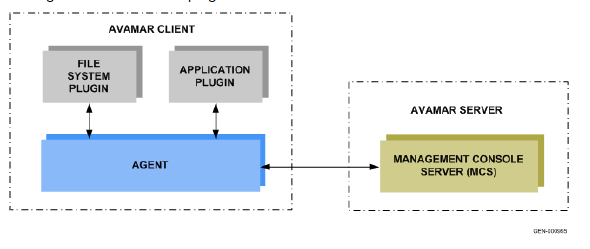
The MCS interacts with the client avagent to start backup and recovery. Avamar agents are platform-specific software processes that run on the client and communicate with the Management Console Server (MCS) and any plug-ins installed on
that client. The MCS contacts the client’s avagent process and starts an avtar to perform a backup or recovery. 

I have made some changes on configurations on mcserver.xml files /usr/local/avamar/var/mc/server_data/prefs/mcserver.xml and after the changes i'll need to restart MCS to make sure it takes affect.

As usual, you will need to login as ADMIN, or in my case i login as root and then change to Admin ID

admin@utility-01:~/>:su - admin
admin@utility-01:~/>:ssh-agent bash
admin@utility-01:~/>: ssh-add ~admin/.ssh/admin_key
STOP MCS (Its always suggested that you run dpnctl status first before stopping the MCS to check any services is down)
admin@utility-01:~/>: dpnctl stop mcs
dpnctl: INFO: Shutting down MCS...
dpnctl: INFO: MCS shut down.
After MCS Stopped, check the status
admin@utility-01:~/>: dpnctl status
dpnctl: INFO: gsan status: up
dpnctl: INFO: MCS status: down.
dpnctl: INFO: EMS status: up.
dpnctl: INFO: Backup scheduler status: down.
dpnctl: INFO: dtlt status: up.
dpnctl: INFO: Maintenance windows scheduler status: enabled.
dpnctl: INFO: [see log file "/usr/local/avamar/var/log/dpnctl.log"]

Start back MCS

admin@utility-01:~/>: dpnctl start mcs
dpnctl: INFO: Starting MCS...
dpnctl: INFO: To monitor progress, run in another window: tail -f /tmp/dpnctl-mcs-start-output-4109
dpnctl: INFO: MCS started.
Checked again the status
admin@utility-01:~/>: dpnctl status
dpnctl: INFO: gsan status: up
dpnctl: INFO: MCS status: up.
dpnctl: INFO: EMS status: up.
dpnctl: INFO: Backup scheduler status: down.
dpnctl: INFO: dtlt status: up.
dpnctl: INFO: Maintenance windows scheduler status: enabled.
During the start back MCS , there's a line shows to tail one file to monitor the progress. Here is the files, it will show you verbose
root@utility-01:~/#: tail -f /tmp/dpnctl-mcs-start-output-4109
check.mcs                        passed
=== PASS === check.mcs PASSED OVERALL (prestart)
Starting Administrator Server at: Thu Oct 11 14:51:00 SGT 2012
Starting Administrator Server...
2012-10-11 14:51:22.988:INFO::Logging to STDERR via org.mortbay.log.StdErrLog
2012-10-11 14:51:23.065:INFO::jetty-6.1.23
2012-10-11 14:51:23.100:INFO::Extract lib/axis2.war to /usr/local/avamar/var/mc/server_tmp/Jetty_0_0_0_0_9443_axis2.war____.w8a9ms/webapp
2012-10-11 14:51:26.267:INFO::Started SslSocketConnector@0.0.0.0:9443
Administrator Server started.
INFO: Starting Data Domain SNMP Manager....
INFO: Connecting to MCS Server: utility-01.corpnet2.com at port: 7778...
INFO: Successfully connected to MCS Server: utility-01.corpnet2.com at port: 7778.
INFO: No trap listeners were started, Data Domain SNMP Manager didn't start.
Sometime, in older version of Avamar when you stopped MCS it will stop the maintanencice and schedule, to start it back run this command:
dpnctl start maint

dpnctsl start sched

Netbackup: oprd returned abnormal status (96)

It started when i got this message on of the the media server:


Mar 11, 2012 2:55:55 PM - awaiting resource mediaserver013_tld2. Waiting for resources.           Reason: Tape media server is not active, Media server:  mediaserver013 ,           Robot Type(Number): TLD(2), Media ID: N/A, Drive Name: N/A,           Volume Pool: LTO2, Storage Unit:  mediaserver013 _tld2, Drive Scan Host: N/A,           Disk Pool: N/A, Disk Volume: N/A 


Further check on media server it self, reveal this error:


root@ mediaserver013 /usr/openv/volmgr/bin/vmoprcmd -doprd returned abnormal status (96)IPC Error: Daemon may not be running
What i did to resolve this:

One media server, stop NBU services
root@ mediaserver013  # /usr/openv/netbackup/bin/goodies/netbackup stop


Stop PBX Exchange on media server
root@ mediaserver013 # /opt/VRTSpbx/bin/vxpbx_exchanged stop


Run nbrbutil command on Master server to reset any allocation on that media server
root@ masterserver#/usr/openv/netbackup/bin/admincmd/nbrbutil -resetMediaServer mediaserver013 


Start PBX Exchange on media server
root@ mediaserver013 # /opt/VRTSpbx/bin/vxpbx_exchanged start


Start NBU services on media server
root@ mediaserver013  # /usr/openv/netbackup/bin/goodies/netbackup start


Types of Backup

This explanations from Acronis is easy to understand for beginners:


RPO and RTO- a worked example

This information i read in Wikipedia (here's the link  ) , im in the midst of designing and writing a proposal for a small organizations for their backup and DR solutions.  In DR scenario, two most important things you must remember is RTO & RPO.  Below is the explanations from wiki page:


The above figure is an example of how RPO and RTO might pan out in a practical situation. Tape is used for backup in this example. The tapes are sent offsite once per day at around the same time, but this timing is not fully guaranteed. The offsiting operation does happen to occur at roughly the same time of day in the chart above. The daily backup offsiting tasks in this example are as follows:
  • A set of backups are made to tape, possibly via a disk staging area? The synchronisation point for each set of backups is late in the backup operation in this example as several large databases have to be backed up and all of them are required for a Synchronisation Point (this is typical of such systems).
  • After that the tapes have to be ejected, collated, and catalogued as they are boxed. It is often the case that offsiting operations are batched across a wide spectrum of systems at a data centre; generally the backups for all services have to wait for the very last one to be created and boxed before they can be sent to the loading bay for transport.
  • Pickups by offsite data repositories are expensive. Generally a daily pickup with a reasonably priced contract will have only an approximate time for pickup and will be predicated on the data centre being ready with the tapes when the van turns up- extra pickups will be generally too expensive to contemplate on a regular basis so a data centre must build contingency time into the preparation period before the pickup is due to occur.
All of which must be done before the pickup- and all of which must be included in the RPO calculation because the synchronisation point being sent offsite depends on backups that were started very near to the start of these activities. So: a recovered service, after a restore from one of these daily backups, will be very likely to start up as at the end of the online day perhaps 13 or so hours or more, before the restored tapes were driven away from the Production data centre.
Against this background, suppose that a Major Incident occurs just before an offsiting pick up (worst case) and as always the assumption is "total site loss, instantly"- so the prepared backups never leave the site. In this case the RPO is set to 48 hours- only twice the normal offsiting cycle. As it happens, on this occasion pickups have been regular for a while and you might make the mistake of thinking that because two offsiting operations have occurred within the RPO period noted above, you have two sets of tapes you might be able to use and still be within the RPO. This is not the case- the earlier set of tapes will produce a recovered service as at a recovery point that is much older than it needs to be to meet the 48 hour RPO. In this example perhaps 12 or 13 hours over that time. In this example, consider the effect of the latest set of offsited tapes being rendered useless by a critically defective tape in the set (perhaps a 5-10% chance?)- as you can see by the example above, you can now NOT meet the RPO at all. Tape capacity is increasing all the time- fewer tapes mean that individual tape defects damage more backed up data.
To complete the picture, the RTO is noted above too. In this case the service was recovered well before the RTO limit was hit. It is however interesting to contemplate the fact that in this example the RTO does NOT start just after the Major Incident. In this example, as often there is in reality, there is seemingly too much delay. A quick decision to go to invocation of the ITSC Plan is always the best decision; in principle... The rule in setting an RTO should be that the RTO is the longest period of time the business can do without the IT Service in question. On the back of this appropriately economic decisions must be taken at the design stage about how the IT Service is built and run. It must be allowed however that some time has to be spent in making the decision to invoke the ITSC Plan, this decision time is an unknown variable- remember too there are often quite large sums of money spent immediately the decision to invoke is taken- staff being called in for extended periods of 24 hour working cover and large fees charged by some recovery service providers. In the example, there is the almost inevitable fudge that the RTO is set to the maximum time the business can do without the service whilst knowing full well that there is very likely to be a period of decision making before it.


How to empty file without delete/recreate or VI

This is simpler way to empty a file in bash, few options for you to choose:

Option 1:
bash# cat /dev/null > [filename]

Option 2:
bash# > [filename]

Option 3:
bash# echo -n > [filename]

Option 4:
bash# cat > [filename]
and then Press Ctrl -D

Netbackup MS-SQL Backup Processes

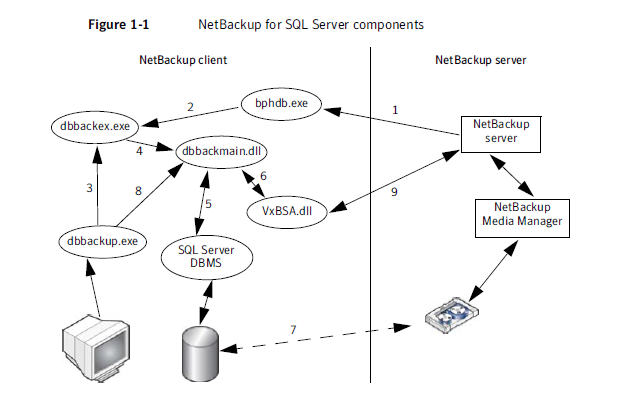
If you tried to cancelled backup jobs from NBU GUI but the next stream still keep spawned a new job (in a case where many Database in one server).  This process call dbbackex.exe on the MS SQL Client will still be listed as running in Task Manager. If several MS SQL backups have failed, an identical number of dbbackex.exe instances will be listed in Task Manager. These can safely be killed.  The reason for the hang is that the error message returned by the SQL Server is not being handled by dbbackex.exe and this process dbbackex.exe  can be killed if the MS-SQL backup job wont killed.


The correct behavior in such a situation is that dbbackex.exe should skip the database and continue to back up the remaining databases


More details on DBBACKEX.exe Taken from NBU for MS-SQL Server admin Guide.


■ The NetBackup for SQL Server GUI (dbbackup.exe) allows you to browse for
SQL Server objects, normally, databases, filegroups, and database files.
dbbackup.exe invokes dbbackmain.dll (8) for accessing the SQL Server
master database. NetBackup for SQL Server accesses information about SQL
Server using ODBC.
■ The NetBackup for SQL Server GUI (dbbackup.exe) also allows you to browse
for SQL backup images. The NetBackup catalog contains the images you can
browse. To access the contents of the catalog the GUI invokes
dbbackmain.dll, which uses VxBSA function calls to access the NetBackup
Server database manager.

Symantec NetBackup Ends the Backup Window with 100 Times Faster Backups

Symantec is delivering a new approach to data protection and introducing NetBackup 7.5 with new options, including NetBackup Accelerator to speed backups by up to 100 times while delivering “Instant Full Recovery” capability, NetBackup Replication Director to integrate NetApp® Snapshots™ with backup, and NetBackup Search to allow simple search and recovery of backup data and selective legal hold. Unlike other backup technology that relies on the IT team to integrate multiple disparate backup solutions, NetBackup is available as a single integrated appliance for the data center, remote office and virtual environments, providing customers with simplified deployment and operations.


Read more on Symantec Press Release HERE

Netbackup Media in use

ERROR: When attempting a restore, the required media will not mount, stating "Media is in use", when it is known that the media is not physically in use. The restore appears to hang.


We can release the media by the allocationKey :

backupserver-root /usr/openv/netbackup/bin/admincmd: ./nbrbutil -dump > /var/tmp/nbrb.out

 Media ID in this case is SL2531


backupserver-root /usr/openv/netbackup/bin/admincmd: cat /var/tmp/nbrb.out |grep SL2531
         index=0 (Request provider=TapeSpanProvider resourcename=NEXT MEDIA RESOURCE  userSequence=0 (mediatapespanrequest: request=(MediaRequest: mediaId=SL2531 mediaServer=mediaserver1.int.com mediaKey=0 userReservationId= assignedTime=1324299337 client=uk1us00001.corpnet2.com usageType=2 mustBeNdmp=no driveName=STVDSADI001_P1_20 drivePath= mediaPool= robotNumber=-1 slotNumber=-1 density=-1 ndmpControlHost= failIfNoMedia=yes externalFile= mediaType=2 mediaSubType=0 isNdmp=false isTirRestore=false isFlashbackupRestore=false isBlockMapRead=false isCatalogBackup=false isGcsCatalogBackup=false isVMWare=false isLifeCycle=false preferVtlToDirectAttachedTape=true) previousid={E371B58A-1DD1-11B2-913D-0003BA36C061} previousFailed=no)))
        MdsAllocation: allocationKey=455557 jobType=2 mediaKey=4005380 mediaId=SL2531 driveKey=0 driveName= drivePath= stuName= masterServerName=stvsxbak03.ggr.co.uk mediaServerName=mediaserver1.int.com ndmpTapeServerName= diskVolumeKey=0 mountKey=0 linkKey=0 fatPipeKey=0 scsiResType=0 serverStateFlags=0

Now release the media by referring its allocation ID which is 455557:

backupserver-root /usr/openv/netbackup/bin/admincmd: ./nbrbutil -releaseMDS 455557
Refer here for more information.

How to verify backup status using Avamar MCCLI

This guide is to help you to verify backup status from Avamar Utility Node. If you find using GUI is too slow to validate backup of hundreds of failed client, you can use this command which later you can customize a script and sent to your email etc2.

Syntax:
mccli activity show [GLOBAL-OPTIONS] [--active=Boolean(false)]
[--completed=Boolean(false)] [--domain=STRING]
[--queued=Boolean(false)] --name=STRING [--verbose=Boolean(false)]
[DISPLAY-OPTIONS]
--active=Boolean(false) If set true, only currently running activities are returned.
--completed=Boolean(false) If set true, only completed activities are returned.
--domain=STRING Specifies Avamar server domain containing the client specified by the --name argument.
If this option is suppled and --name is not supplied, all activities within that domain are shown.
--name=STRING Specifies client for which activities should be shown.
IMPORTANT: If a fully-qualified client name (for example, /clients/MyClient) is supplied, the --domain argument is ignored.
--queued=Boolean(false) If set true, only queued activities are returned.
--verbose=Boolean(false) If set true, detailed (verbose) activity information is returned. If set false or not supplied, summary
information is returned.

Example:
root@AVAMAR2-01:~/#:  mccli activity show --domain=/clients --name=petai.internal.com0,23000,CLI command completed successfully.ID               Status          Error Code Start Time           Elapsed     End Time             Type               Progress Bytes New Bytes---------------- --------------- ---------- -------------------- ----------- -------------------- ------------------ -------------- ---------1325749602471357 Completed       0          2012-01-05 02:46 GMT 00h:00m:30s 2012-01-05 02:47 GMT Replication Source 17,785,115,628 0.3%9132563981301809 Completed       0          2012-01-03 20:22 GMT 00h:10m:16s 2012-01-03 20:32 GMT Scheduled Backup   10,058,429,430 0.2%9132555240085809 Completed       0          2012-01-02 20:13 GMT 00h:10m:13s 2012-01-02 20:23 GMT Scheduled Backup   10,048,182,833 0.1%9132572629437809 Completed       0          2012-01-04 20:23 GMT 00h:12m:45s 2012-01-04 20:36 GMT Scheduled Backup   10,364,971,854 0.2%9132563880102609 Dropped Session 0          2012-01-03 20:00 GMT 00h:16m:50s 2012-01-03 20:16 GMT Scheduled Backup   228,208,607    <0.05%9132572520094709 Dropped Session 0          2012-01-04 20:00 GMT 00h:18m:12s 2012-01-04 20:18 GMT Scheduled Backup   205,595,909    <0.05%9132574628474509 Completed       0          2012-01-05 01:51 GMT 00h:03m:22s 2012-01-05 01:54 GMT On-Demand Backup   10,384,285,025 0.3%1325663022756671 Completed       0          2012-01-04 02:43 GMT 00h:00m:30s 2012-01-04 02:44 GMT Replication Source 8,604,757,950  0.2%1325573948329840 Completed       0          2012-01-03 01:59 GMT 00h:00m:00s 2012-01-03 01:59 GMT Replication Source 8,687,492,631  0.2% 

If you want to filter only the complete session add –completed argument:

root@AVAMAR2-01:~/#: mccli activity show --domain=/clients --name=petai.internal.com --completed=true
0,23000,CLI command completed successfully.
ID               Status          Error Code Start Time           Elapsed     End Time             Type               Progress Bytes New Bytes
---------------- --------------- ---------- -------------------- ----------- -------------------- ------------------ -------------- ---------
1325574080407145 Completed       0          2012-01-03 02:01 GMT 00h:00m:00s 2012-01-03 02:01 GMT Replication Source 8,772,149,532  0.2%
1325749741228668 Completed       0          2012-01-05 02:49 GMT 00h:00m:00s 2012-01-05 02:49 GMT Replication Source 8,943,263,903  0.2%
9132563520048709 Dropped Session 0          2012-01-03 19:00 GMT 00h:16m:45s 2012-01-03 19:16 GMT Scheduled Backup   240,225,638    <0.05%
9132572160051009 Dropped Session 0          2012-01-04 19:00 GMT 00h:16m:49s 2012-01-04 19:16 GMT Scheduled Backup   210,904,174    0%
9132563620592309 Completed       0          2012-01-03 19:24 GMT 00h:20m:11s 2012-01-03 19:44 GMT Scheduled Backup   9,834,628,293  0.2%
1325663189759348 Completed       0          2012-01-04 02:46 GMT 00h:00m:00s 2012-01-04 02:46 GMT Replication Source 8,642,061,742  0.3%
9132572261614109 Completed       0          2012-01-04 19:27 GMT 00h:21m:39s 2012-01-04 19:48 GMT Scheduled Backup   10,155,148,114 0.2% 

How to initiate image clean up manually

How to initiate image clean up manually against all media server.

#/usr/openv/netbackup/bin/admincmd/bpimage -cleanup -allclients

NBU 7.X: All UNIX 32-bit system support has been discontinued

 From the NetBackup 7.0 Release Notes: "...
All UNIX 32-bit system support has been discontinued. To upgrade these systems to NetBackup 7.0, you must first migrate your current NetBackup 6.x catalogs and databases to a system with a supported platform. However, 32-bit media servers and clients that use NetBackup 6.x are compatible with 64-bit master servers that use NetBackup 7.0.


How to add new alias into existing Zone

Example:

Existing Zone name: Z_NBU_serverA_hba1

In this example, i want to add one more alias with name NBU_targets_2

Add alias into existing zone

FabricA:

FabricA:admin> zoneshow  Z_NBU_serverA_hba1
 zone:  Z_NBU_serverA_hba1
                NBU_targets_1; serverA_hba1_fab_b

Syntax:
zoneadd "ZONE_NAME", "NEW_ALIAS_NAME"

FabricA:admin> zoneadd "Z_NBU_serverA_hba1", "NBU_targets_2"

Now, we verify the zone name with newly added alias:

FabricA:admin> zoneshow  Z_NBU_serverA_hba1
 zone:  Z_NBU_serverA_hba1
                NBU_targets_1; serverA_hba1_fab_b;NBU_targets_2

MySQL Dump Script for Windows

This is my simple script used to do a mysqldump on Windows server and then associate it with Windows Scheduler task. 

Mysqldump syntax, there are three general ways to invoke mysqldump:
shell> mysqldump [options] db_name [tables]
shell> mysqldump [options] --databases db_name1 [db_name2 db_name3...]
shell> mysqldump [options] --all-databases


I found few other script here and there and i combine it in one script here:


REM [at] echo off

for /f "tokens=1" %%i in ('date /t') do set DATE_DOW=%%i

for /f "tokens=2" %%i in ('date /t') do set DATE_DAY=%%i
for /f %%i in ('echo %date_day:/=-%') do set DATE_DAY=%%i
for /f %%i in ('time /t') do set DATE_TIME=%%i
for /f %%i in ('echo %date_time::=-%') do set DATE_TIME=%%i

"C:\Program Files\MySQL\MySQL Server 4.1\bin\mysqldump" -u root -p207007 --all-databases> "C:\mySQL_Backup\%DATE_DAY%_%DATE_TIME%_db.sql"

"C:\Program Files\7-Zip\7z.exe" a -t7z "C:\mySQL_Backup\%DATE_DAY%_%DATE_TIME%_db.7z" "C:\mySQL_Backup\%DATE_DAY%_%DATE_TIME%_db.sql"

del "C:\mySQL_Backup\%DATE_DAY%_%DATE_TIME%_db.sql"
 Here is the sample output on Windows command :
C:\>REM [at] echo off
C:\>for /F "tokens=1" %i in ('date /t') do set DATE_DOW=%i
C:\>set DATE_DOW=Wed
C:\>for /F "tokens=2" %i in ('date /t') do set DATE_DAY=%i
C:\>set DATE_DAY=10/05/2011
C:\>for /F %i in ('echo 10-05-2011') do set DATE_DAY=%i
C:\>set DATE_DAY =10-05-2011
C:\>for /F %i in  ('time /t') do set DATE_TIME=%i
C:\>set DATE_TIME=04:48
C:\>for /F %i in  ('echo 04-48') do set DATE_TIME=%i
C:\>set DATE_TIME=04-48
C:\>"C:\Program Files\MySQL\MySQL Server 4.1\bin\mysqldump" -u root -p207007 --all-databases 1>"C:\mySQL_Backup\10-05-2011_04-48_db.sql"

C:\>"C:\Program Files\7-Zip\7z.exe" a -t7z "C:\mySQL_Backup\10-05-2011_04-48_db.7z" "C:\mySQL_Backup\10-05-2011_04-48_db.sql"

7-Zip 9.20  Copyright (c) 1999-2010 Igor Pavlov  2010-11-18
Scanning

Creating archive C:\mySQL_Backup\10-05-2011_04-48_db.7z

Compressing  10-05-2011_04-48_db.sql   56%


The compressing will show you the percentage complete, and once compressing complete it will delete the original sql dump file.

7-Steps :Continual Service Improvement